All stories · Article
Your subscriber may not want to cancel. They may just want a different scent.
Share: WhatsApp · Telegram · X · Facebook · LinkedIn · Email

Imagine a customer who has received cedar-scented candles every month for four months. As autumn arrives, they want to switch to citrus.
But when they open their subscription account, the only options they see are pause or cancel.
So they cancel.

This is the problem highlighted by ecommerce marketer @HeySukhwinder on X.
Sukhwinder | Ecom Email Marketing@HeySukhwinderYou gave customers two choices: pause or cancel.
What about giving them something new?
A customer has subscribed for four months. Their bathroom is full of cedar, but now they want citrus for fall.
They click swap and find only two options: pause for a month or cancel.
So they cancel. You lost a customer who might have stayed if they could simply switch scents.
Pause delays. Cancel ends. Swap keeps.
Let them…Nov 8, 2026 · View on X
The customer wasn't necessarily tired of the brand or the subscription. They wanted a different version of the same product, but the cancellation flow gave them no obvious way to ask for it.
The subscriber who cancels may only want a different scent
The cedar-to-citrus example points to a broader issue: customers can still want the product while no longer wanting the version they originally purchased.
The same pattern appears in returns. A customer who orders the wrong size may still want the item. Yet some stores make a refund easier to find than an exchange.
Two ecommerce discussions illustrate this exchange-first problem:
- Muhammad Shoaib discusses customers who want a different size rather than a refund.
- Mohamed El-Ghorfi argues that refunds should not automatically be the first resolution offered.
These are practitioner observations, not controlled studies. They do, however, highlight an important distinction:
What does a Shopify Subscriptions customer actually see?
For stores using Shopify Subscriptions, Shopify's own Help Center lists the actions customers can take through their accounts:
- Update payment details.
- Change their shipping address.
- Pause or resume a subscription.
- Skip upcoming orders.
- View past orders.
- Cancel a subscription.
Shopify - Subscriptions customer experience
Changing the subscribed product is not included in the documented list of customer self-service actions. Shopify describes subscription product changes as a merchant-side task in the admin.
There is another detail worth noticing.
Shopify sends an upcoming-order reminder email three days before the recurring charge. The email gives customers time to skip an order, update payment details, or pause or cancel their subscription.
A product swap is not among the actions listed in that reminder.
That creates a potential gap: the customer gets a reminder and a chance to manage their subscription, but may still have no visible route to change what arrives next.
Why one missing option can cost more than one order
Subscription businesses depend on repeat purchases. Losing an active subscriber means losing the opportunity to earn from future orders, not just the current shipment.
And customers do value flexibility.
This does not prove that offering swaps will prevent 78% of cancellations. It does show that flexibility is an expectation worth taking seriously.
Some subscription brands put that flexibility in front of shoppers before they sign up. The FAQ on fragrance brand Skylar's Scent Club page says members can skip or swap upcoming scents, and can swap a month's scent they are not excited about for another travel-size fragrance:
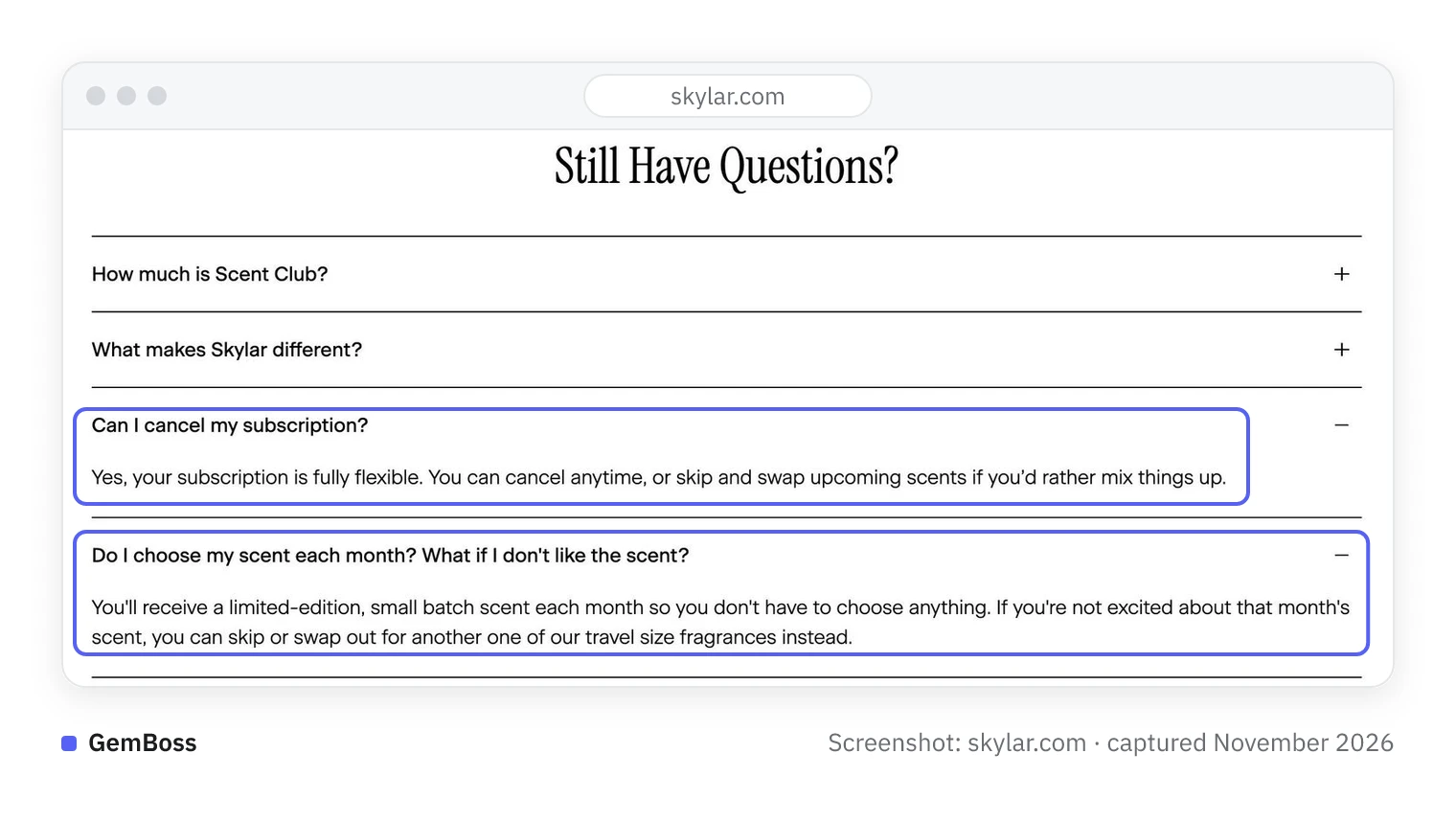
Screenshot of Skylar, captured November 2026.
The tools already exist. For example, Recharge supports product and variant swaps through its customer portal.
But there is a catch: customer swapping is disabled by default. Merchants must enable it and configure which products customers can switch to.
In other words, having a subscription app with swap functionality does not guarantee that customers can use it.
A different model does not tie the subscriber to one fixed product. Klone Scents' Klone+ membership page says the $29 monthly fee becomes $29 in store credit that never expires, and lists skip, pause or cancel anytime:
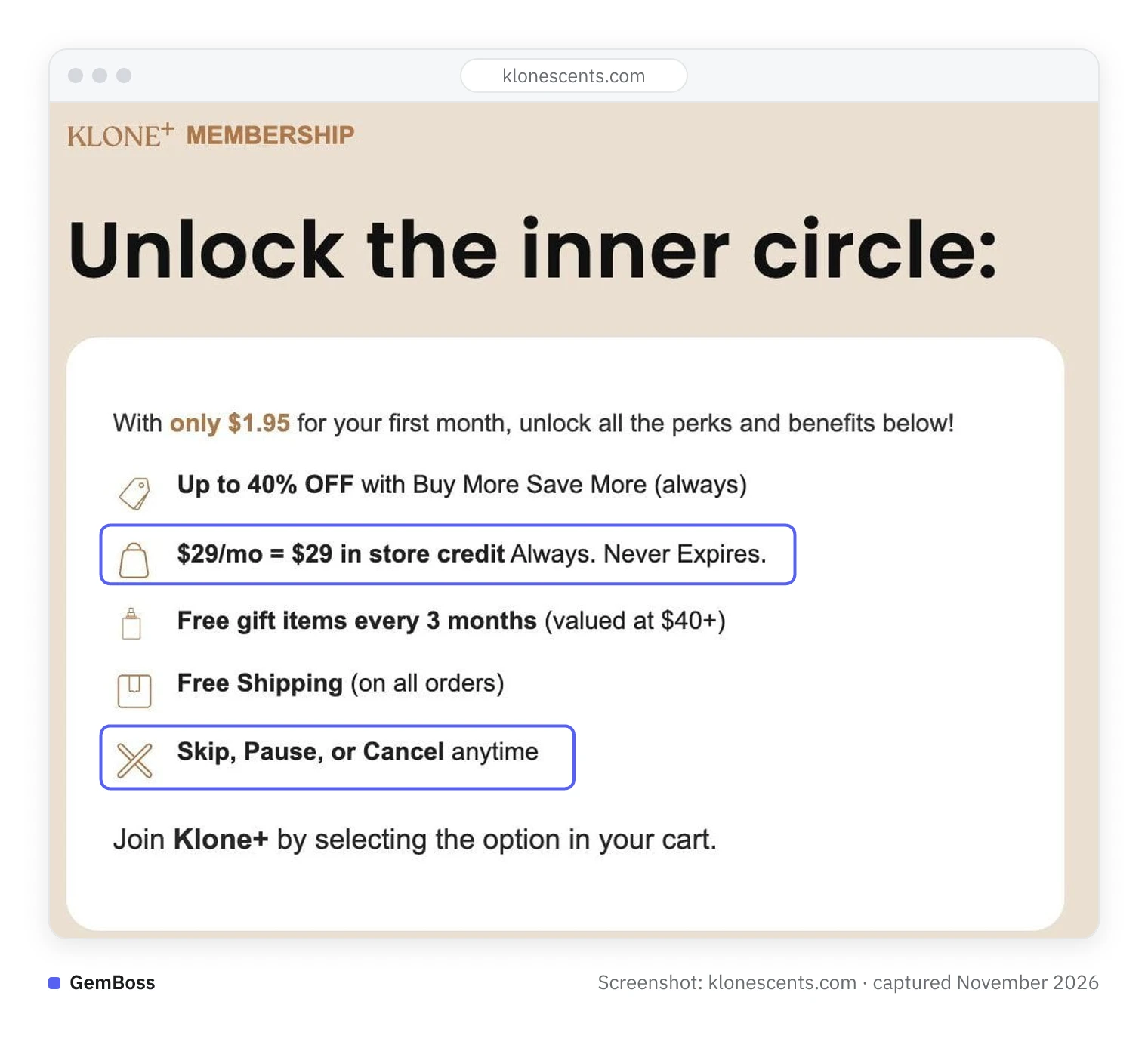
Screenshot of Klone Scents, captured November 2026.
With credit, a member can choose a different product at each order instead of asking for a swap.
Walk through your own cancellation flow before the holiday rush
Before adding another app or redesigning your retention strategy, check what your customers actually see.
A simple three-step audit:
1. Test the customer journey.
Use a customer account and navigate from Manage Subscription to Cancel. Record every option shown along the way.
Can the customer switch scents, flavors, sizes, or products before cancelling? Or are pause, skip, and cancel the only visible choices?
2. Check what your app allows.
If you use Shopify Subscriptions, remember that product changes are handled by the merchant in the admin. When a customer asks to switch, you can make the change on their behalf.
If you use Recharge or another third-party app, check whether product swapping is enabled, which products are eligible, and whether the option is visible in the customer portal.
You can also make the support route clearer in your upcoming-order reminder emails: tell customers how to contact your team if they want a different product before the next charge.
3. Measure what happens.
Track how many cancellation requests turn into product changes, how many subscribers remain active afterward, and how many still cancel.
Do not assume that every saved cancellation represents incremental revenue. Measure the outcome against your own baseline.
Stores with only one product variant or no subscription model may not need this change.
The takeaway: Before assuming a subscriber no longer wants your product, check whether your store has given them a way to choose another one.