All stories · Article
Meta’s new “Measure conversions on customer devices” feature matches website purchases with ad interactions on customers’ devices
Share: WhatsApp · Telegram · X · Facebook · LinkedIn · Email
Meta’s new “Measure conversions on customer devices” feature helps attribute more website purchases to ads
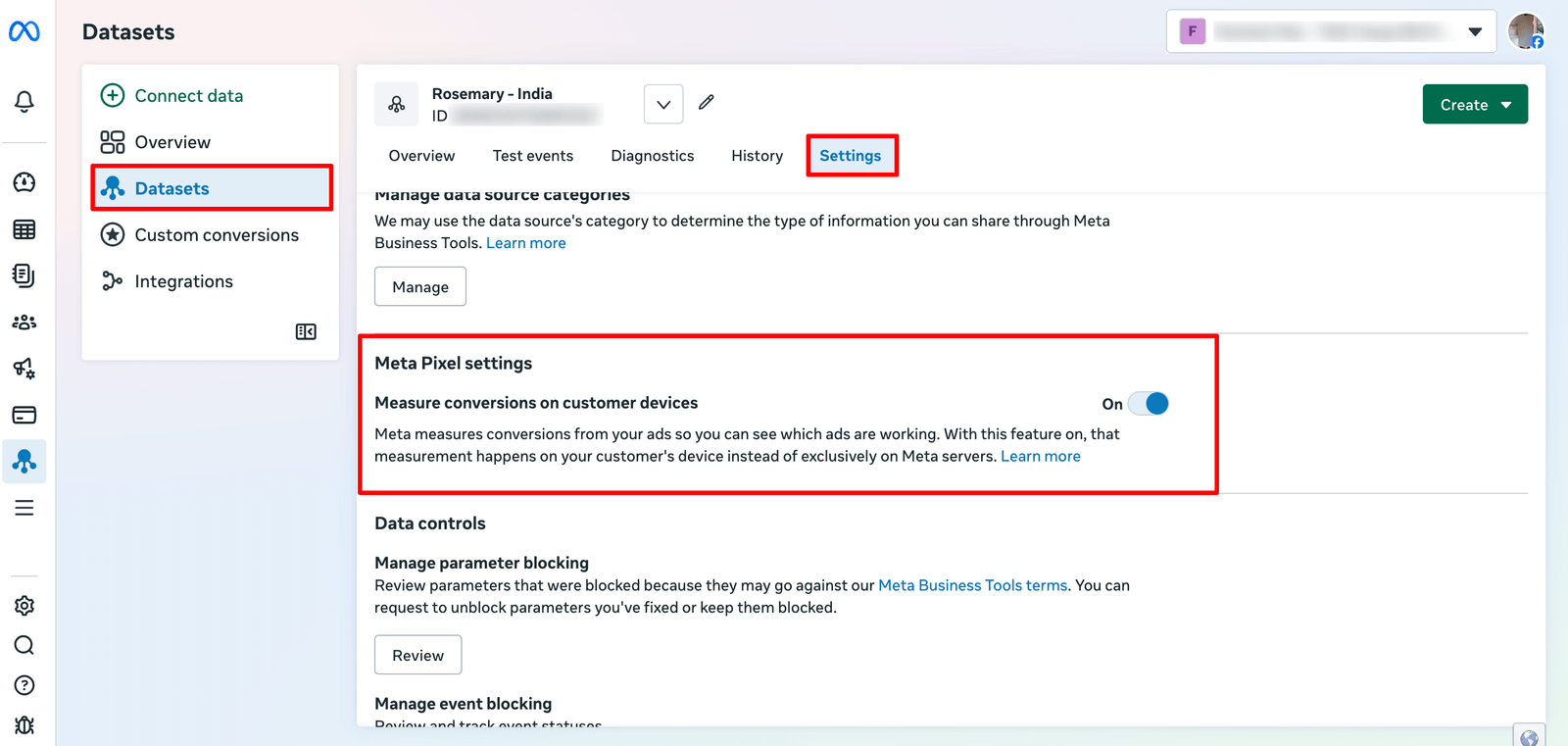
Starting November 12, 2026, Meta began rolling out a new setting called “Measure conversions on customer devices” in Meta Events Manager. According to Meta’s Business Help Center, the feature is enabled by default for eligible Pixels and allows some conversion matching to happen directly on a customer’s device.
For Shopify sellers, this matters because Meta may now attribute more website purchases to advertising campaigns, even when the number of actual orders has not changed.
The update arrives just 15 days before Black Friday, when many sellers are increasing ad budgets and closely monitoring campaign performance. Understanding what changes in Meta’s measurement, and what does not, is important before interpreting any movement in reported results.
How does Meta match ad interactions with website purchases on customer devices?
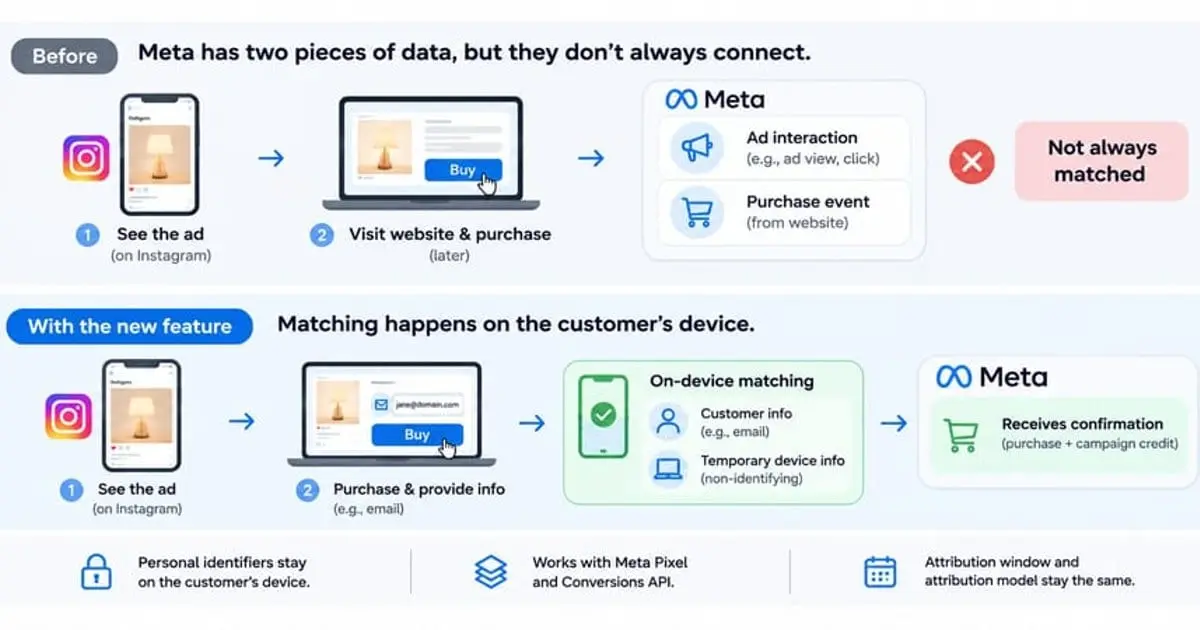
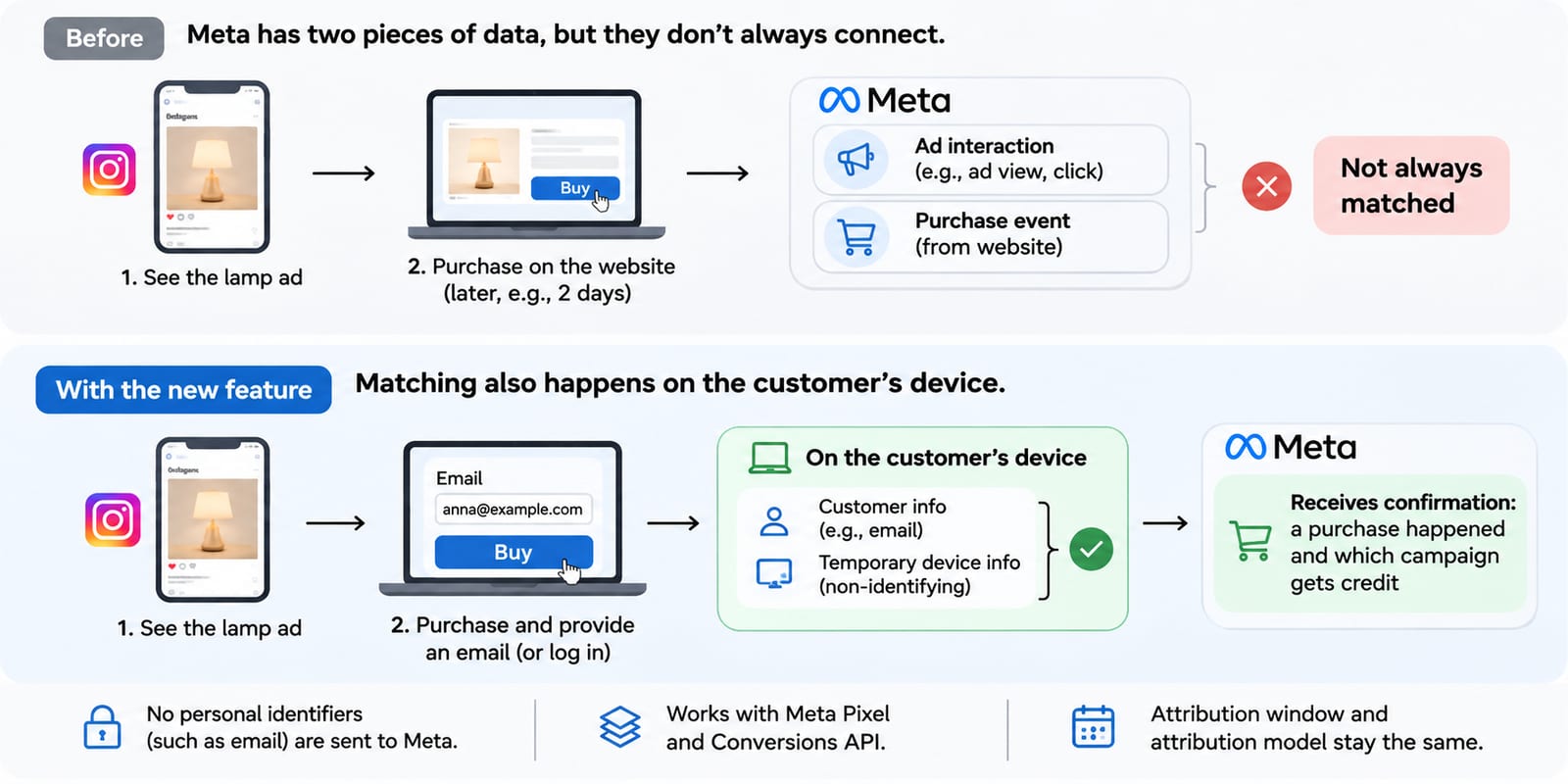
Consider the example in Meta’s help article: someone sees an ad for a lamp on Instagram, visits the website two days later, and completes a purchase.
Meta may have information about the ad interaction and separately receive a purchase event from the website. However, it cannot always connect the two records and determine that the purchase came from that particular ad interaction.
The new setting allows part of this matching process to happen on the customer’s own device.
According to Meta, the process uses:
- Information the customer has already shared with the business, such as an email address.
- Temporary, non-identifying device information, which helps support the matching process.
In simple terms, the device is used to compare information associated with the earlier ad interaction against information available when the customer completes a purchase. This gives Meta another opportunity to connect the transaction with an advertising campaign.
Once the match is made, Meta says it receives confirmation that a purchase happened and which campaign should receive credit. The identifying information used during the matching process is not shared with Meta.
There is an important limitation to this explanation: Meta has not publicly detailed the exact matching algorithm. It has not specified precisely how the device retains or retrieves the ad-interaction information, which device signals are used, or how a campaign is selected when a customer has interacted with multiple ads. The description above reflects Meta’s published explanation, not a complete technical specification.
The feature works alongside the existing Meta Pixel and Conversions API setup. It does not replace either one. Meta also says the attribution window and attribution model remain unchanged. The update affects which conversions can be measured, not the rules used to assign credit to ads.
Does this feature solve the order discrepancy between Shopify and Meta?
Not necessarily. The feature may help Meta connect more purchases to advertising interactions, but it does not make Shopify and Meta measure the same thing.
A Shopify store and Meta Ads Manager serve different measurement purposes:
| Platform | What it measures |
|---|---|
| Shopify Admin | Actual orders placed in the store |
| Meta Events Manager | Purchase events received by Meta through tracking integrations |
| Meta Ads Manager | Purchases attributed to Meta advertising under its attribution rules |
For example, imagine a store has:
- 100 orders recorded in Shopify.
- 92 Purchase events shown in Meta Events Manager.
- 68 purchases attributed to ads in Meta Ads Manager.
These figures represent three different stages of measurement.
The 100 Shopify orders are the actual transactions recorded by the store. The 92 Purchase events indicate how many purchase events Meta has received and recorded. The 68 purchases in Ads Manager represent the subset Meta has attributed to its advertising campaigns.
The new setting may help Meta connect some purchases with ad interactions that it could not previously match. As a result, the number of purchases reported in Ads Manager could increase without the store receiving any additional orders.
However, it does not guarantee that all 92 Purchase events will be attributed to ads, or that Meta’s reported purchases will match Shopify’s order count. The exact types of conversion gaps the feature can recover have not been fully explained by Meta.
Which Meta Ads Manager metrics could change after the rollout?
If Meta attributes more purchases to campaigns, several reported performance metrics may change even when actual sales remain the same.
Purchases
The number of purchases attributed to Meta campaigns may increase because more transactions can be matched with ad interactions.
Cost per purchase (CPA)
CPA is calculated as:
CPA = Total ad spend ÷ Number of attributed purchases
If ad spend stays at $1,000 and attributed purchases increase from 50 to 60:
- Before: $1,000 ÷ 50 = $20 per purchase.
- After: $1,000 ÷ 60 = $16.67 per purchase.
The reported CPA falls, even though the store may not have generated any additional orders.
Return on ad spend (ROAS)
ROAS is calculated as:
ROAS = Revenue attributed to ads ÷ Ad spend
If Meta reports more attributed revenue while ad spend remains unchanged, reported ROAS may rise. However, Meta has not clearly explained whether every conversion recovered through this feature will include purchase value. Sellers should therefore avoid assuming that ROAS will automatically increase.
The key distinction is between a change in measurement and a change in business performance. More attributed purchases do not, by themselves, mean more sales or higher revenue.
Which Shopify stores are eligible for this feature?
Meta’s published setup requirements identify two important conditions:
- The Meta Pixel must be installed directly on the website page. It must not be installed inside an iframe or as an image-only Pixel.
- The website must require customers to log in to an account using an email address or mobile phone number.
Meta also states that the feature is not active for people located in the EU and UK.
The login requirement is particularly relevant for Shopify stores. Stores that allow customers to complete purchases through guest checkout may not meet the requirement that customers must log in. However, sellers should check their actual setup and the eligibility status shown in Events Manager rather than assuming that every store with guest checkout is automatically excluded.
The setting is enabled by default for eligible Pixels, and sellers can turn it off in the Pixel settings in Events Manager.
What should Shopify sellers check before Black Friday?
With the rollout taking place shortly before Black Friday on November 27, sellers should establish a clear reporting baseline before interpreting any changes.
Check the setting in Events Manager
Go to Data Sources, select the relevant Pixel, and open Settings. Find “Measure conversions on customer devices” and check whether it is enabled. Review each relevant Pixel rather than assuming one setting applies to every data source.
Record the current reporting baseline
Before comparing performance after the rollout, record:
- Shopify orders.
- Purchase events in Meta Events Manager.
- Purchases attributed in Meta Ads Manager.
- Ad spend, reported purchase value, CPA and ROAS.
This gives the team a reference point for identifying whether a change in Ads Manager reflects measurement or actual business growth.
Keep Pixel and Conversions API monitoring in place
The new feature works alongside existing tracking integrations. It is not a reason to remove the Pixel or stop sending server-side events through Conversions API. Continue checking event delivery, deduplication and data quality.
Annotate the rollout date in performance reports
Mark November 12, 2026, as a measurement change in internal dashboards and reporting documents. This helps prevent a sudden increase in attributed purchases from being interpreted as an immediate improvement in campaign performance.
What has Meta not clearly explained about the new feature?
Meta has described the broad matching process, but several technical and measurement details remain unclear:
- The exact matching algorithm: Meta has not explained precisely how the device connects an earlier ad interaction with a later purchase.
- The role of each data signal: Meta mentions customer-provided information, such as email, and temporary, non-identifying device information, but has not published the exact signals or their matching priority.
- Purchase value: Meta has not clearly specified whether every recovered purchase will include its order value in Ads Manager.
- Campaign optimization: Meta says the feature can provide a stronger signal and improve campaign performance, but has not fully detailed how recovered conversions affect bidding and delivery.
- The exact conversion gaps it can recover: Meta has not clearly distinguished whether the feature primarily addresses purchases that were received but could not be matched, purchases that were not measured through conventional server-side tracking, or both.
These unanswered questions mean sellers should monitor the actual changes in their own accounts rather than assume that every store will see the same outcome.
What does this new measurement setting mean for Shopify sellers?
Meta’s new setting gives its measurement system another way to connect website purchases with advertising interactions. It may make campaign reporting more complete, but it does not create additional orders or guarantee higher revenue.
For Shopify sellers, the priority is to distinguish between more purchases attributed by Meta and more purchases actually made by customers.
That distinction becomes especially important during Black Friday, when campaign budgets, CPA and ROAS are closely monitored. A change in attribution should be treated as a measurement change until it is supported by actual sales data.
Sources · 1 · facebook.com
- Meta’s Business Help Center · facebook.com
Ask AI next
- Should I disable Meta's on-device matching if my store uses guest checkout, or leave the default setting on?
- How do I tell if a rise in attributed purchases is from this new feature rather than normal week-to-week variance?
- What on-device signals does Meta use for this matching, versus Google's or Apple's conversion methods?
- Are other ad platforms like Google or TikTok rolling out similar on-device conversion matching around the same time?
- Are there third-party apps that reconcile Shopify order counts with Meta's new attributed purchase numbers?